Skip to content

For the independently minded.

Your time. Well spent.

A little less admin. A lot more doing what you love. Track your time, find your rhythm, and turn your work into invoices — all in Konsola.

Free forever. No credit card.
Pro, when you need it. $5/month.

02 / A GOOD DAY, FROM START TO SENT

Find your flow.
Keep the whole picture.

Konsola is time tracking and invoicing for freelancers: a timer and a weekly timesheet, reports, and invoices made from your tracked time. Everything is free, with 3 invoices; Pro is $5 a month or $50 a year, for unlimited and automatic invoices.

01 / TrackFree

Your meetings, already logged.

Connect Google Calendar to log selected completed events. Check scheduled hours and projects before invoicing. Prefer a timer? Keep using the browser extension or Mac app.

  • A timer, or time by hand

    Start the timer when you begin and stop it when you are done, or log the time afterwards. Yesterday's work continues with one click.

  • The week at a glance

    A weekly timesheet with a row for each project and task: type a duration into a day, and the totals add up as you go.

  • Clients, projects and rates

    Hourly rates for a client, a project or a task, budgets for projects, and rounding that never changes the time you tracked.
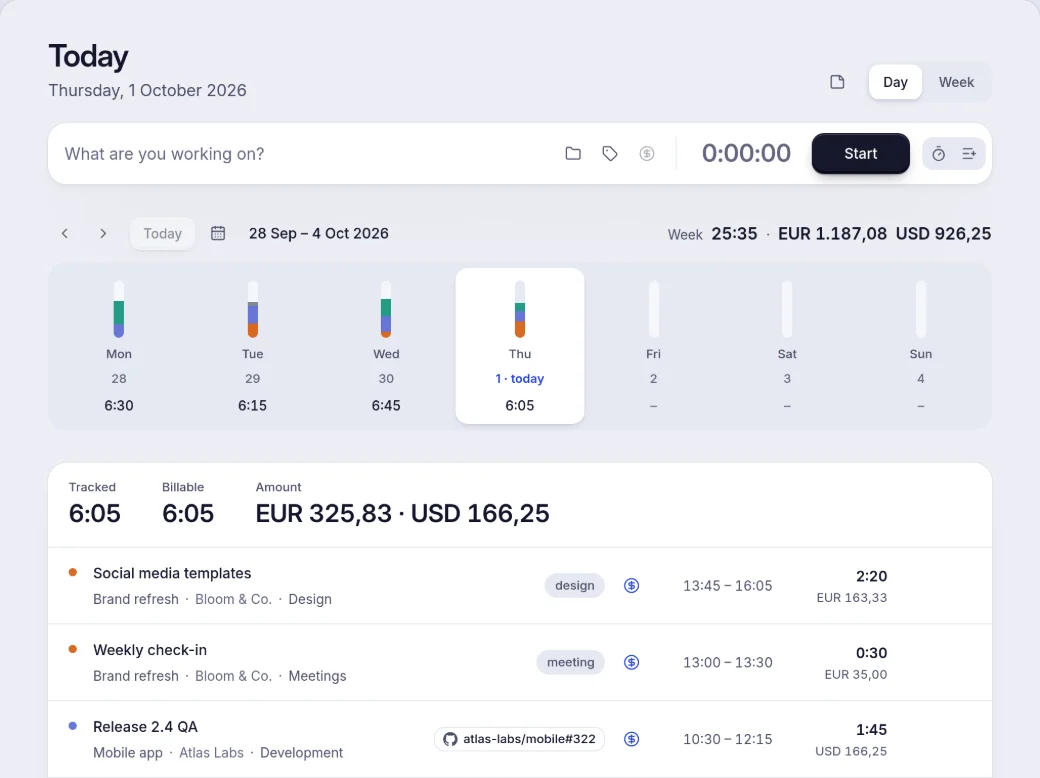
Konsola Track with a timer, a populated working week and real example entries
Start with the work. Konsola keeps the time.

02 / UnderstandFree

A clear view for you. A simple link for your client.

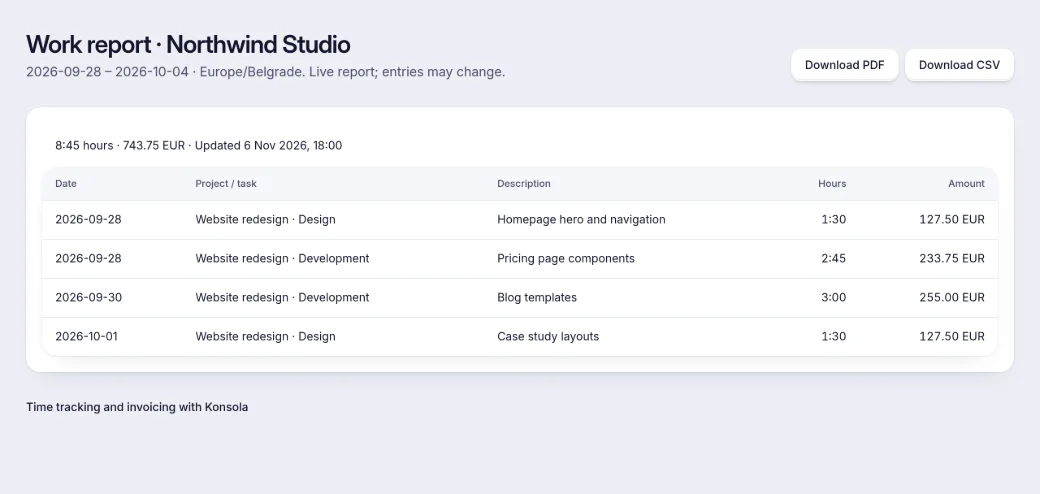
See your time and billable work, then share a scoped live report. Choose whether descriptions and amounts are visible, preview the result, and revoke access whenever you need.

  • Reports you can send

    Totals for any period, time by day and project, and CSV or PDF exports. Share a live report with one client through a revocable link; no client account needed.

A shared Konsola work report for Northwind Studio, with selected descriptions, hours and amounts
Demo report: the work your client can see, without an account.

03 / InvoiceFree

From good work to a good invoice.

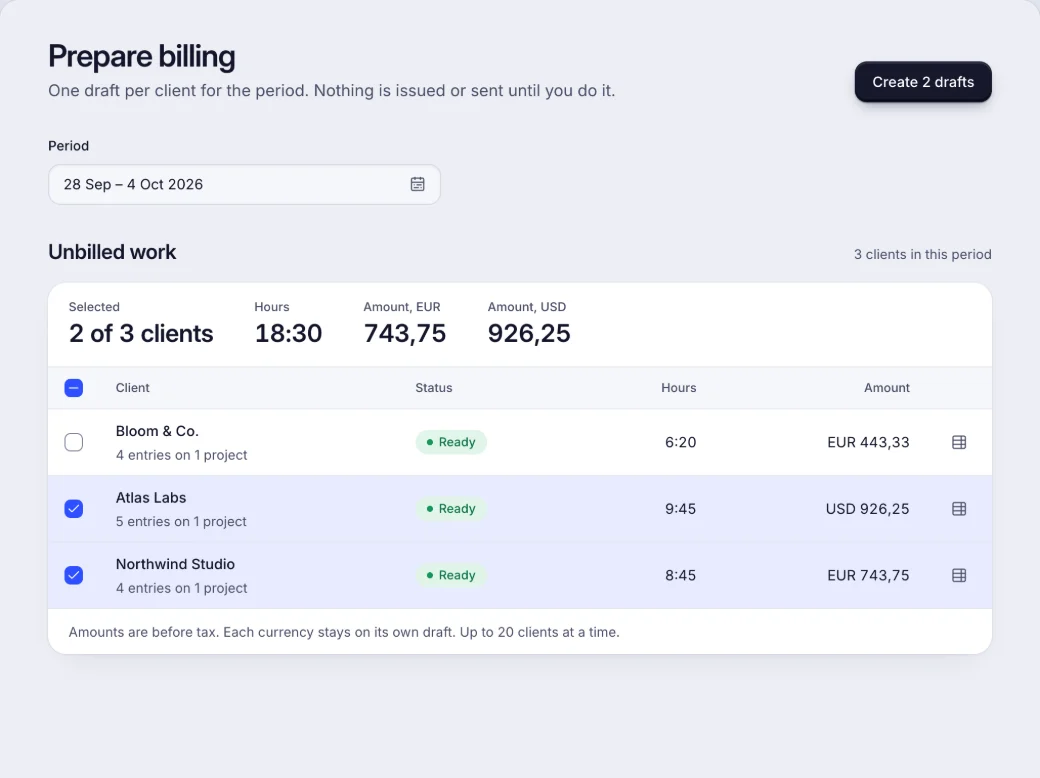
See what is ready to bill, fix missing rates and prepare drafts for your clients. Existing drafts stay visible for review. Your first three invoices are free; with Pro, drafts can arrive in your inbox every week or month.

  • Invoices from your time

    Review a billing period, fix missing rates and prepare drafts for selected clients with their saved preferences. Download each invoice as a PDF. Your first 3 are free; Pro makes as many as you need, and e-mails you a client's draft every week or month. Invoiced time is never billed twice.

  • Links with titles

    Paste a GitHub, Jira, Trello or Azure DevOps link into an entry, and the item's title becomes its description.

Konsola billing preparation with eligible work and separate currencies for three demo clients
Demo billing period: review the work before creating client drafts.

One workflow. More room for the work you love.

Find your flow — start free

03 / SIMPLE PLANS. NO SURPRISES.

Start free.
Stay in flow.

Everything is free, with 3 invoices. Pro adds unlimited and automatic invoices. Pick what fits your work.

Pro billing

Pro billing
Two months free

Free

For everyday work

Everything, with 3 invoices, for as long as you like.

$0forever

No card. No time limit.

  • The timer and manual entries, with tags and billable time
  • The weekly timesheet
  • Clients, projects and tasks, with rates and budgets
  • The overview and reports, exported as CSV or PDF
  • 3 invoices from your tracked time, as PDF
  • Titles for GitHub, Jira, Trello and Azure DevOps links
  • Import from Harvest, Toggl Track, Clockify and My Hours
  • Your data exported or deleted at any time
Start free

Your account is ready as soon as you sign in.

Pro

For your billable days

Everything in Free, with unlimited and automatic invoices.

$5a monthBilled monthly

$50a yearBilled yearly

$5 a month or $50 a year — two months free.

Plus VAT or sales tax where it applies.

  • Everything in Free
  • Unlimited invoices from your tracked time
  • Automatic invoices for a client, weekly or monthly
Get Pro

Sign in, then upgrade in Settings → Plan & billing.

Small print. Plain English.

Taxes

Prices are in US dollars, without VAT or sales tax. Where we have to collect it, Stripe adds it at checkout and shows the total before you pay.

Cancelling

Cancel at any time in Settings → Plan & billing → Manage subscription. Pro stays until the end of the period you paid for, and nothing is charged after it.

Refunds

If Konsola is not for you, ask within 14 days of your first payment, monthly or yearly, and it is refunded in full. Renewals are not refunded, unless the law where you live says otherwise. Read the refund rules.

Payments

You buy Pro from Engineers Space LLC, the company behind Konsola. Stripe processes the payment, keeps your card details and sends the receipts.

04 / CHANGE TOOLS. KEEP YOUR WORK.

Bring your history.
Check the result.

Import is free

Start with one client. Check the clients, projects and hours brought over, see what stayed out, and download a receipt. Export your data whenever you need it.

FROM YOUR OLD TRACKER

  • Harvest

    From its CSV exports.

  • Toggl Track

    From its data export (a ZIP) or a Detailed report CSV.

  • Clockify

    From an API key.

  • My Hours

    From an API key, on its Basic plan or higher.

TO YOUR NEXT CHAPTER

Clients. Projects. Tasks. Tags. Time.

Contact and tax details, project codes, colours, rates and budgets come over wherever your source includes them.

Start free

Sign in, then open Settings → Import.

  1. Try one client first.

    Choose a client and inspect the preview before writing. Bring the rest later; time already imported is skipped.

  2. Check the result.

    Compare source and imported hours, counts and explained differences. Unknown source totals are labelled, and the receipt stays in your import history.

  3. Room to change your mind.

    Repeat imports skip entries already brought over. Undo within 7 days, until any imported entry is on a Konsola invoice.

Konsola import receipt with selected and verified time, created records and an unknown-duration source exclusion
Demo import: check written hours, created records and anything the source could not verify.

05 / A LITTLE CLARITY

A few things,
cleared up.

The small questions before a fresh start. Here are the straight answers.

Something else on your mind? E-mail us.

Is Konsola free?

Yes. Tracking, the weekly timesheet, reports, link titles, the import and your first 3 invoices are free, with no time limit and no card. Pro adds unlimited and automatic invoices for $5 a month or $50 a year.

Can Konsola log meetings from my calendar?

Yes. Connect Google Calendar and choose up to three calendars. Konsola creates logs after eligible events end. Review the time and project before invoicing or sharing. Calendar duration is scheduled time, not verified attendance.

Does my client need a Konsola account?

No. Create a link to one client’s live work report or a saved issued invoice. Anyone with the link can open it, so review what is visible before sharing. Links expire after 90 days by default; you can choose another expiry or revoke them. Reports update with your time entries. Issued invoice content stays fixed, while payment status stays current.

Who is Konsola for?

Freelancers and independent consultants who track their own time and bill clients for it. An account is one person: there are no teams, approvals, attendance or payroll.

Can I import from Harvest, Toggl Track, Clockify or My Hours?

Yes. Bring your clients, projects, tasks, tags and time, with the details your source provides. Try one client first and preview the changes before anything is written. Afterward, inspect a downloadable receipt of counts, hours and differences, including any totals that cannot be verified. Export your account from Settings → Account. Preserve previously invoiced time, or set a cut-off date for older billable entries. Undo within 7 days, until any imported entry is on a Konsola invoice.

Where is my data stored?

In the EU. The database is in Amsterdam, the Netherlands, and our e-mails are sent from Ireland.

Can I export or delete my data?

Yes, at any time, in Settings → Account: download all of it as JSON, or delete the account and everything in it. With Pro, cancel the subscription first.

How do I cancel Pro?

In Settings → Plan & billing → Manage subscription. Pro stays until the end of the period you paid for. A first payment is refunded in full if you ask within 14 days.

Do the prices include VAT?

No. Pro is $5 a month or $50 a year, and where we have to collect VAT or sales tax, Stripe adds it at checkout and shows the total before you pay. A business with a VAT number can enter it there.

Does Konsola work on my phone?

Yes. Konsola runs in the browser on computers, tablets and phones, so there is nothing to install.

06 / YOUR NEXT GOOD DAY STARTS HERE

Make room for
your best work.

Less time keeping track of everything. More time doing what you love. Your next chapter starts with a free Konsola account.

Find your flow — start free

Free forever. No credit card.

Sign in to get started. Your first 3 invoices are free; Pro adds unlimited and automatic ones when you need them.